h1

Apple Music, the mystery unravelled

November 22, 2024

I’ve used Apple devices for years, decades even. And I’ve been a MacBook user for more than a decade, but when I switched from using iTunes on a PC to iTunes, and then Apple Music, on a Mac, and I acquired an Apple Music subscription, I couldn’t work out what was going on.

I think I’ve now worked it out. But it’s taken a while. So I thought I’d write down what I’ve learned, although you may all already know this!

In the old days

In the days of iTunes on both Mac and Windows, you could rip your music CDs onto your PC, and then you selected which of your albums, songs or playlists you wanted to sync with your iPhone. You plugged your phone into a USB port, hit “Sync” and off it went. Depending on the amount of music you had in your library, and the speed of your computer, it could take minutes, or it could take hours. And it was all physically copied to your phone.

What happened?

More than 10 years ago I switched my main computer from a Windows laptop to a MacBook. For a while it continued to work the same way, so I synchronised a selection of music from my MacBook to my iPhone by plugging it in. But then I subscribed to Apple Music and suddenly I had the ability to sync my music to the music Cloud.

Foolishly I clicked “sync library” on both my Mac and my iPhone. That’s when the trouble started. I ended up with duplicate copies of some albums on my iPhone. And some duplicates on my MacBook too. I couldn’t work out what was going on, so I just disabled sync and lived with it. For some time. For several years actually. I kept saying to myself, “I really have to sit down and work out how this works.” But I never did.

And now?

Well I recently replaced my aging Intel MacBook Pro with an M2 MacBook Air. Brilliant little machine. I’ve done a lot of travelling in the last year. And I was becoming increasingly annoyed that whatever music I wanted to listen to on the plane wasn’t on my phone. Or only a couple of tracks of one album was. Or I had two copies of it. So I resolved to sort it out.

The setup

I now have a MacBook Air, an iPhone (SE3) and an old iPad Air 2 I recently inherited from my wife. My iPhone has 256GB storage and could hold my entire (about 100GB) music collection, but what I listen to when I’m travelling and offline is limited, so I don’t need all of it. The iPad has only 32GB of storage, and I really only use that to play music when I’m at home and online, where it’s paired with an Alexa Echo Dot that plays through my hifi. And it has nowhere near enough storage to download my entire music collection.

What I hadn’t realised

Assuming you have an Apple Music subscription, the ideal setup is for your entire music library to be stored on your Mac (or your Windows PC). Then it expects you to sync this with the Library in the Cloud.

You could split your physical library across multiple devices and sync them in both directions. But I’m a bear of very little brain, so that’s too confusing. I’d rather it was all physically stored in one place. I also strongly recommend backing this up – I’ve done this to both Apple Time Machine and Microsoft OneDrive – it’s very easy to hit the wrong button and delete a track, an album or an entire Library. It’s good to have somewhere you can get it back from without having to re-import from your CD collection.

Cloud music is separate from your iCloud data storage, and can hold up to 100,000 tracks. Then you can (should) clear all the music you’ve transferred to your phone using a USB cable, and sync Apple Music to your phone with your Cloud Music account.

Then you can see your entire Music Library and you can choose what to download and store on your device for offline playing. Well sometimes you can choose, but sometimes it just downloads stuff for you without you asking for it. But only on the iPhone, the iPad appears to be different.

What I did

First, I had to sort the mess that was my Apple Music on my Mac. That’s because I’d actually got two physical music collections, one on each device. And because I’d hit “sync library” on both devices, I’d got copies going both ways, and therefore duplicates on both devices. The iPad, being a recent acquisition, had no music on it at all. A good place to start.

I turned Library sync off on my phone. No point making the situation worse. I decided to have all the music physically stored on my Mac, and to sync it from there to my other devices.

So I held down the Option key while opening Apple Music on my Mac. That allowed me to either switch libraries or to create a new one.

I created a new library, and then synced it with the Cloud. A whole lot of stuff came down, which I selected and deleted from the library. I did this a couple of times until the Library was empty. Then I copied my entire music collection (from backup) into the Music folder and used Apple Music to import it all. (File|Import – select the Music folder – Open). It took a while. I left it overnight.

When it had finished, I opened Music on my iPad and had a look at the Library. Most of the music was showing, but (thankfully) none had actually downloaded. You can see the status of each track in the Library – if it’s in bold type it’s available in the music library, and provided you’re online at the time you can hit play and it’ll play that track. If it’s grey then it’s not available in the music library and you can’t play it. If you play the album it’ll skip those tracks.

And if it’s in bold with a little down arrow in a grey circle next to it, it’s been downloaded and is available to play on your device even when you’re offline.

For reasons that still escape me, about 15% of the tracks I’d imported into Apple Music on my Mac hadn’t synced with the iCloud library, and therefore weren’t available on the iPad.

When you look at the music on your Mac, there’s no obvious way to fix this. There’s no option to force a track, or an album, to resync with the cloud. Furthermore there’s no way to see, on the Mac, which tracks have synced with the cloud and which haven’t, as they all show as being physically on the machine – because they are. This is the physical location of the music tracks.

So you have to look at your iPad (or Phone, but the phone behaves differently, as I’ll discuss later) to see which tracks haven’t synced.

So I set up my iPad next to my Mac, Apple Music open on both, and when I open the same album on each device you can see, on the iPad, which tracks haven’t been synced with the cloud. What you then have to do is delete each of these tracks from the Mac Library, and remove the files.

Fortunately they are not completely deleted, they are moved to the bin. So I opened two side-by-side Finder windows, one with the Music folder and one with the Bin. Starting with an empty Bin (very important) I could then see the deleted tracks, and drag them back into the folder from which they’ve just been deleted. Then back in Music select File | Import and either Command + click each of the tracks I’ve just replaced, or select the album, and click “Open”. This imports the tracks into the Library again, and forces a re-sync with the cloud. You can monitor progress on the iPad because when you delete the tracks from the Library on the Mac, after a few moments they disappear from the Library list on the iPad. Then when you re-import them they first show in pale grey, with a cloud and arrow icon alongside. And then a few minutes later they show up in bold, so they’re now synced with the library.

But not every time. Occasionally one or more fail to sync even this time, and I had to repeat the entire procedure.

Now sometimes an entire album failed to sync with the cloud. Don’t just delete the album from the library, because if you do, although the tracks will all be moved to the Bin, the containing folders (the Album and the Artist folders) aren’t moved to the Bin and disappear. You can recreate them, but that’s a lot of mucking about and typing, and they have to be exactly the same as the ones that were deleted or Apple Music complains. I found the easier way was to go into the Finder window, copy the album folder (which copies its contents), if there were other albums by the same artist, or copy the artist folder if there was only one album, and paste it to another folder on the computer – I used my Downloads folder.

Then you can delete the entire album from Music. Then I went back to Finder and dragged and dropped the copied folder back to its original location. Then I could re-import it into Music.

It was taking an inordinately long time to do this with each of nearly 1,000 albums. Every time I found one that didn’t need to be re-synced it felt like a victory.

However, there is an easier way. There’s an option, in Music, to re-sync the entire library. File | Library | Update Cloud Library. This does the entire library again. But it also takes hours. And it also occasionally fails. So I still had to go through every album on the iPad to ensure all the tracks were there.

There were other glitches. Most irritating of all was the failure to use the same artwork on the iPad as on the Mac for each album. It turned out that generally Music on the iPad uses the artwork associated with the first track in each album. So if that track is missing and the artwork for the next track is different (which can often happen if you’ve used “Download Album Artwork” in Music in the first place) then it’ll get the wrong artwork. I found I had to open the artwork on the Mac, copy the image to the desktop (Cmd+Shift+4) then open the album, select all the tracks at the same time, right-click and select “Get Info” and use “Add Artwork” to paste the copied artwork back to every track in the album. That usually worked. I still have a couple of albums on my iPad with the wrong artwork, and I can’t work out how to fix them. Life’s too short.

What about the iPhone?

Well, that was even more complicated.

I’d disabled Library Sync on my iPhone, and then deleted all the contents, so the iPhone Library was empty. My mistake was to turn Sync back on before I’d sorted the Cloud library using my iPad.

It turned out that every track that I’d deleted, replaced and re-imported manually got automatically downloaded onto my iPhone. But only those. So when I’d finished sorting out and syncing the Library from my Mac onto my iPad I now had an apparently random selection of some tracks that were downloaded to my iPhone, but very few whole albums. This didn’t happen with the iPad. Bizarre. My advice if you’re grappling with this is to disable syncing on any devices other than the one you’re using to identify missing tracks, and then only when you’ve completely restored the library, re-enable syncing on that device. After, of course, deleting and removing any music that’s stored on that device.

When I gave up and used the nuclear “Update Cloud Library” menu option on the Mac, those tracks that were re-synced with the Cloud didn’t download to the iPhone.

So my final task was to go through each album on my iPhone to decide which I wanted stored locally, and to either remove the downloads or download the rest of the album.

Downloading the rest of the album is easy. From the Library/Albums view, open an album. If it shows a tick in a circle at the top it’s already fully downloaded. If it shows instead a down-arrow in a circle then it isn’t, but clicking it downloads the rest of the album, and you’re sorted.

Getting rid of the downloaded tracks you don’t want is harder. To see which these are, instead of Library / Albums, you go to Downloaded/Albums and then click each album to see if it’s all there or not. If it’s not all there you can only remove the downloaded tracks individually. You click the … at the right-hand side of each track and select the “Remove” option, helpfully highlighted in red. Then you’ll be given the option to either remove the download (yes) or remove from Library (No! Don’t do that. It’ll delete this track from every copy of the Library, including the master version on your Mac or PC, and you’ll either have to re-rip it, or restore it from that very handy backup you made right at the beginning…)

But if you click the … at the top of the album you will only get the “Remove” option if the entire album is already downloaded. From here you can’t download it, and the only delete option is to remove the entire album from the Library (as I’ve already said, that could be catastrophic).

I discovered it’s easier to leave “Downloads”, go back to “Library” and then to remove the local copy of albums you don’t want downloaded, you have to download the entire album, and then you can use the Remove option to Remove the Download. Perverse isn’t it.

Is it sorted now?

Yes. Finally, after several hours of work, and even more hours of letting it do its own thing, I have all 966 albums stored on my Mac, synchronised with the Cloud library, available to play from my iPad and some of them selectively downloaded to my iPhone.

In theory I could now remove the downloads from my Mac and simply rely on the copies I’ve synced with the Cloud Music. But I used to work in the storage industry, where there is a saying that, “If you don’t have at least three copies of something, it doesn’t exist.” And also I couldn’t play it offlline if the only place everything existed was in the Cloud. I’m a strong proponent of cloud storage. But I also want a physical copy locally both for backup and because internet access isn’t ubiquitous. Yet.

What happens if I cancel my subscription to Apple Music? I have no idea, but at least I have a hard copy and two backup copies of my original music library, so if necessary I can start again!

h1

Voter ID: voter suppression or vote integrity?

May 5, 2023

There’s a lot of discussion currently about voter ID in the UK. This has been used for elections in Northern Ireland for some time, but has just been introduced in England, Wales and Scotland.

The first elections in which this comes into force were the English local council elections on May 4th (Star Wars Day) 2023. Yesterday, as I write this.

In the UK it’s clearly a solution in search of a problem. According to the Electoral Commission, in 2019, the year of the last general elections, there was one prosecution for personation, and one police caution for the same. There were three other convictions and one other caution, but they were for different offences which wouldn’t be addressed by voter ID. On this basis there’s no risk to the integrity of elections in the UK which voter ID can resolve.

There have been some reported issues of significant voting fraud in the UK, but those were to do with postal votes. Examples include Birmingham in 2004 and Peterborough in 2019. But you still don’t need to prove who you are to obtain a postal vote – indeed one way of voting if you don’t have suitable photo ID is to apply in advance for a postal vote which you can hand in at the polling station on the day! You can also apply for a proxy vote up until 5pm on election day; your proxy has to have photo ID but you don’t.

Example citizencard ID card for Lily Steward
Example of suitable voter ID

There is a widespread view that the Conservative government is introducing voter ID as a means of suppressing the votes of sections of the population who are likely to vote against them. The government’s own estimate is that 2 million people in the UK (population 68m) don’t have suitable photo ID. Many of these may be less likely to vote Conservative. To confirm this suspicion you only have to look at the list of valid IDs. A senior citizen’s bus pass (available to 60 year olds in London and 66 years olds elsewere) is valid ID, but an 18+ bus pass isn’t. As far as I can see the requirements to obtain such passes are similarly rigorous. Also student ID isn’t valid.

However the Tories may be shooting themselves in the foot, as many older people, particularly the over 80s, will have given up driving, so won’t have a driving license, and can’t get travel insurance, so may have given up their passport. These are the two most common forms of ID. So a proportion of the cohort most likely to vote Tory may also be turned away at the polling station for not having suitable ID.

We are yet to see how effective this was at suppressing votes – there were certainly people turned away unable to vote yesterday, both for not having suitable ID and for not resembling the photo on the ID sufficiently. But voter suppression works only where the result is likely to be close – and at the moment the Tories are being annihilated at the polls, so it’s unlikely to have had any influence on any results yesterday.

I’m not against requiring voter ID in principle; it is likely to improve the integrity of, and elector trust in, elections and election results. However in the majority of countries which require voter ID, the population already has ID cards issued to all adults. Then it’s clear that requiring voter ID isn’t suppressing votes, as all eligible voters already have suitable ID. This government is, as usual, doing things arse-backwards by introducing the requirement for voter ID before issuing ID cards.

The only good news is that the Tories introduced voter ID before the English local elections – the publicity surrounding it combined with many people’s actual experience of being turned away may increase the awareness of this requirement before the next general election.


National ID cards

There have been efforts to introduce ID cards in the UK before, most recently under the Labour government in which David Blunkett was Home Secretary, and it’s been the Tory party which has seen them off. Their usual response is about privacy being compromised and that it’s just not British to demand people carry their ID at all times.

Example of possible UK national ID card, carrying the image of David Blunkett, Labour Home Secretary at the time it was suggested.
David Blunkett’s example ID card

However almost every EU country (with the notable exception of Denmark) issues national ID cards.

An example of a German national ID card
Example of German ID card

Frankly, I doubt many people would trust the present UK government not to do something unpleasant with our ID card data, such as sell it to a private company, or give the police powers to demand to see your ID for no valid reason.

However if the government is really serious about managing illegal immigration (that subject is for another post) they would make their task a lot easier if all UK citizens and residents had an ID card. Then anyone without one would either be a tourist or an illegal immigrant. The government of the day would need to introduce much tighter privacy controls on the data if it were to successfully introduce national ID cards, but they would solve a lot of problems.

I have Portuguese residence, so I have a Portuguese Residence card. This also has my fiscal number (equivalent of my National Insurance number) and my health number (equivalent of my NHS number) and a space for my social security number, on the back. All my government issued ID numbers are in a single place, on a card I carry with me all the time.

Really handy.

Example of Portuguese residence ID card
h1

Is cash obsolete?

June 13, 2022

This post is the result of a recent article in The Times about a new generation never using cash, and my experience of cashless payments both in the UK and abroad.

I did reply to the article. This post is an expanded version of that reply.

Going cashless

As an older person, I’ve embraced the cashless society, using Apple Pay for almost everything. However there are some glitches. My local dry cleaners accepts only cash – fortunately I’m of that generation that still carries some just in case. Also on a recent drive north, I found with horror that the toll booths on the M6 Toll road are cashless, but don’t accept mobile payments – you have to have a real card! Fortunately my wife had one of hers with her…

There are also some shops which will accept cashless payments, but only over a minimum amount. I assume it’s down to how much they’re charged to process individual payments, but for a full cashless society we must be able to use a card, or mobile payment, for the smallest amounts. Big chains (Marks & Spencer, Waitrose, Tesco and Sainsbury’s amongst others) permit this. In my experience it’s the small businesses such as newsagents and cafés which have a minimum payment.

Card, or mobile device?

It should be noted that there is a difference between using a card and using a mobile device (phone, tablet, smart watch). I’ve noticed some people, particularly those of my age, are reluctant to use mobile payments. There are some advantages. The first is that it’s more secure. With a card transaction the retailer may get your card details, but with a mobile transaction all they get is a one-time code from Apple or Google, this means an unscrupulous employee is unable to use your card details for transactions elsewhere. Second, there’s no payment limit. Because this is a validated transaction – with your fingerprint, face ID or unlock code – there’s no contactless limit on the amount of the transaction.

There are some downsides too. First because you’re using an intermediary (Apple or Google) the Consumer Credit Act protection for transactions over £100 doesn’t apply, so you may not be able to claim compensation from your card issuer if something goes wrong, such as faulty goods or non-delivery. To be fair this protection applies only to Credit Cards, so if you pay with a Debit Card you’re not protected anyway. Second because of the one-time code it may be difficult to get a refund if you want to return something you paid for with your mobile device. It should still be possible, but it can, in my experience, be tricky.

Covid’s effect

When Covid first struck in the UK we didn’t know how it was spread. There was a possibility that it was spread by fomites (particles on surfaces) so there was a reluctance to accept cash which might have been handled by an infected individual. This accelerated the adoption of cashless payments, and there are now many places that won’t accept cash at all. This has been accelerated further by the cost of depositing cash at a bank – many banks charge for cash deposits depending on the type of account, so businesses may prefer cashless transactions.

Cashless abroad

The UK has been a laggard in this compared to other countries, particularly in Scandinavia. It seems the Covid effect on cashless payments has occurred in many other European countries including Germany and France.

Denmark has been almost entirely cashless for years… in fact I recently spent 10 days there and could have avoided using cash entirely, but decided to pay for one item with cash to use up the last of my Danish banknotes. Danish businesses have accepted Dankort (Danish debit card) payments for decades; the system also accepts foreign debit cards. But with the march of technology the country is migrating to MobilePay, which requires a Danish phone number… not helpful for foreign visitors.

I use Wise (formerly Transferwise) and have recently acquired one of their multi-currency debit cards, which makes cashless travelling really easy. Revolut offers a similar capability.

Portugal, another country in which I have extensive experience spending money, remains largely cash only. Some establishments will accept card payments, but only with a Multibanco card, which is a debit card issued by a Portuguese bank. Major restaurants and supermarkets will accept major cards and phone payments, but if you’re visiting Portugal, be sure to carry Euro notes and coins – you will need them. Surprisingly (to me anyway) next-door Spain is one of the top cashless countries in Europe according to the Merchant Machine website (although their survey omitted Scandinavia, which in my personal experience is much more advanced down the path to becoming entirely cashless).

h1

Yet more about broadband

June 13, 2022

As you may have seen from my recently updated post about Full Fibre broadband, I’ve terminated the Full Fibre contract and dropped back to my 80Mb/s Fibre to the Cabinet (FTTC) ADSL. This has been provided by Sky Broadband for many years – in fact I’ve been a Sky customer since they acquired UK Online to deliver their broadband service.

However it’s got very expensive. My contract expired in May 2022, and Sky emailed me to say that I would now be charged £38 a month! I called them to see what, if anything, they could do. The best they could do was a £5 discount to £33 a month. Disappointing.

So I hunted around. By far the cheapest was Vodafone, which, with a discount because I have a Vodafone mobile contract, offered 80Mb/s FTTC for £21 a month. Attractive but I passed on this for two reasons. First is that Vodafone wouldn’t let me keep my existing landline number, and the second is that I was unable to speak to anyone about this. I tried calling their customer service number, but all I got was a recorded message telling me they couldn’t answer my call and to use web chat on their website.

But Vodafone’s webchat wasn’t working – I just got a message telling me to phone customer service. So Vodafone was binned.

Next was NOW Broadband. NOW Broadband is part of NOW TV, as subsidiary of Sky which offers television services in the UK over the internet using a WiFi smart stick (or, if you still have one, a set-top box). They offered 80Mb/s FTTC ADSL for £23 a month including a year’s free landline calls. And I could retain my landline number. I signed up online, paid the £5 delivery fee for the NOW Broadband router, and picked a switch-over date.

As it happened, we were away on the switch-over date, so I delayed the router delivery until we were back. I was expecting no internet on our return, but much to my surprise it was all working. When I opened the box containing the NOW Broadband router I realised why… the NOW Broadband router was identical to my existing Sky Broadband router in every respect except for the moulded logo on the case. I’ve left the NOW router in the box.

On examining my router logs it’s clear that the Sky service disconnected about 4am on switch-over day, and NOW Broadband reconnected, using the same router, about 20 minutes later. Given that NOW is a subsidiary of Sky, what I’ve managed to do is to connect to the same network, using the same equipment, at the same speed, for £15 a month less than I was paying Sky.

Result!

Footnote:

I had a little glitch as the landline wasn’t showing Caller ID, which it should. I called NOW Broadband and spoke to a very pleasant lady who reset the line, which fixed the problem. I mentioned that I was still using the Sky router. She encouraged me to do so for as long as possible. She explained that although they look the same, the Sky version of the router uses better components which makes it more reliable, and that I should just keep the NOW router as a backup, just in case!

h1

Ah, Mr Covid, I’ve been expecting you…

December 30, 2021

After almost two years of the pandemic, I’ve finally succumbed to Covid-19 – almost certainly the recently-emerged Omicron variant. Here’s my account of the experience.

How did I get it?

Sophie, the daughter of some close friends, married Ryan on the Saturday before Christmas. This had been arranged for over a year, but before it even happened the event was affected by Covid – around 40 people cancelled, either because they themselves had tested positive, or because of other events, vulnerable relatives or other family commitments which meant they decided it was too risky to attend.

Everyone was asked to lateral flow test (LFT) before the event. I was careful, but when there are 70 people in a confined space, despite the doors and windows being open the whole day (my frozen feet knew about that), if anyone there had already contracted Covid-19 then someone was likely to catch it. Apparently eight of us did, including the bride. I was the last to test positive. My wife, happily, wasn’t one of them.

Sunday involved a walk on Dartmoor with some of the immediate family, with afternoon tea at the bride’s parents’ house, and then on Monday we stopped off in Somerset to see some old friends. I had taken an LFT every day, and all were negative. But on Monday evening, just as we thought we might have got away with it, I started sneezing and feeling unwell.

On Tuesday the symptoms got worse. I still wasn’t sure if it was a cold or Covid. Again that day’s LFT was negative. But the advice if you have symptoms is not to rely on LFTs but to take a PCR test. I had to lie to get one, as the symptoms the NHS website says you have to have to book a test are those of Delta, not Omicron. Professor Tim Spector of Kings College and the Zoe Project has been telling the government this for weeks, but no-one’s listening…

I booked a PCR test for the following day, the earliest I could get, and began self-isolating – Monday would have been day 0 of my 10-day isolation. I decided it was wise for me to sleep in the spare room and to use the guest bathroom. My wife and I started wearing masks in the house if we were in the same space, and we opened a lot of windows. Dinner was taken together, but we sat at opposite ends of the dining table, me nearer the open window.

Positive tests

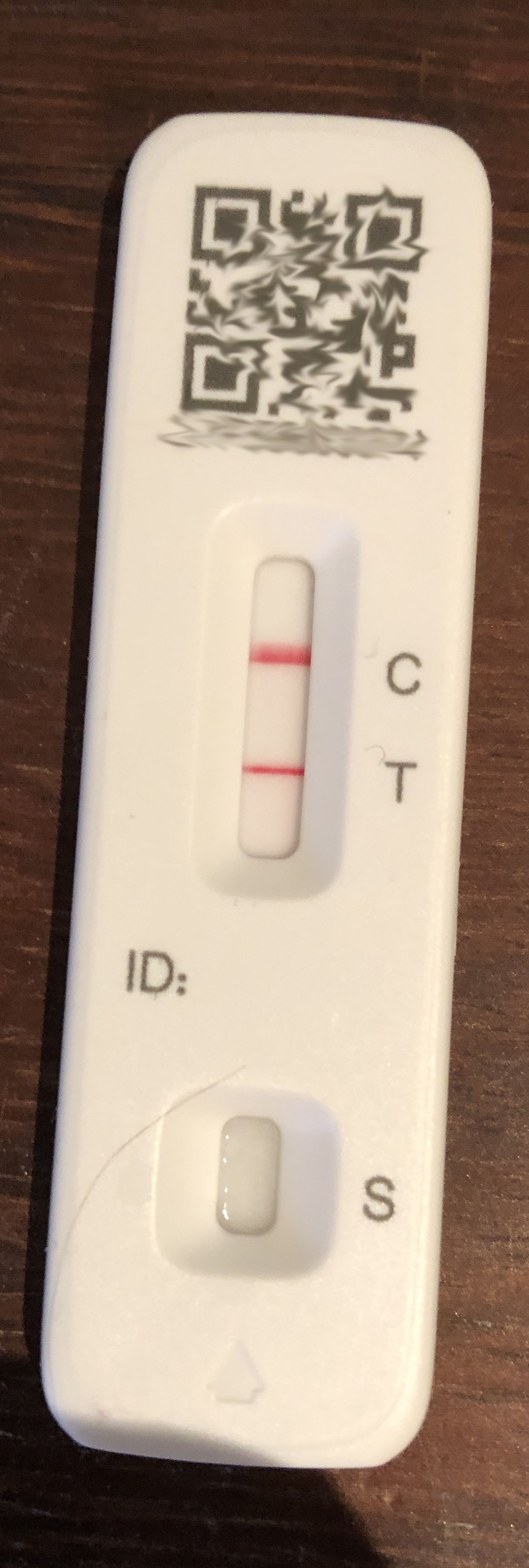
Day 3 LFT

On Wednesday I didn’t feel particularly unwell, but I went for my PCR. I was still thinking it might just be a cold. The result hadn’t come through 24-hours later. We were intending to go to my sister-in-law’s for Christmas, in less than 48 hours, and we needed some certainty, so I took an LFT. I failed. Strongly positive. I notified our friends in Somerset, Sophie’s parents so they could let the others at Sunday tea know, and my sister-in-law. Fortunately it seems none of my contacts contracted Covid from me. Some of that was due to our taking appropriate measures, and some to serendipity.

Anyway, as soon as I reported a positive test I started receiving very confusing, and contradictory, messages from Test & Trace. For some things, such as isolation, you take the day you developed symptoms as day 1, but for many other things the NHS regards the day of your positive test as day 1. For example you can’t get a COVID vaccination certificate, or a certificate of recovery, for 14 days after the date of your positive PCR test (which at this point I didn’t have). Also I got a very long and complex questionnaire to complete…

Your self-isolation period ends 10 days after the onset of symptoms, unless you enter your positive test details into the NHS Covid app, which tells you it’s 10 days after the positive test. And then the government says you can be released from isolation if you pass two LFTs, 24 hours apart, the first no earlier than day 6. However once you’ve tested positive and have symptoms you can’t order LFTs – the website says you have to have a PCR test instead. But since I was already expecting to test positive, taking another PCR would have been pointless, they are so sensitive that I’m going to test positive for several days, possibly weeks, to come.

Finally, late on Thursday, I received confirmation of my positive PCR test. So our Christmas was, for the second year running, to be spent in lockdown.

By Friday I was feeling quite unwell, and consuming paracetamol tablets like they were going out of fashion. Symptoms were similar to a bout of flu: fever, aching muscles, shivering and sensitive skin. But no runny nose or congestion. I also found my sense of smell and taste compromised – not completely gone, but certainly changed.

Christmas dinner was a subdued affair, without much alcohol (I didn’t fancy it, and it didn’t taste right). Sunday was day 6, so I thought I’d try the early-release protocol and take an LFT (we did have a few LFTs left). Still failed.

Also one type of LFT we’d got, that comes in a green box, is terrible. The nozzle of the sample tube is supplied separately and has a little filter in it. When you insert the nozzle into the tube and squeeze to get four drops onto the LFT itself, the pressure sometimes forces the nozzle out, and squirts the liquid all over your hands and the work surface, but not into the LFT. We lost two of seven tests this way. Not good when they’re so hard to get hold of!

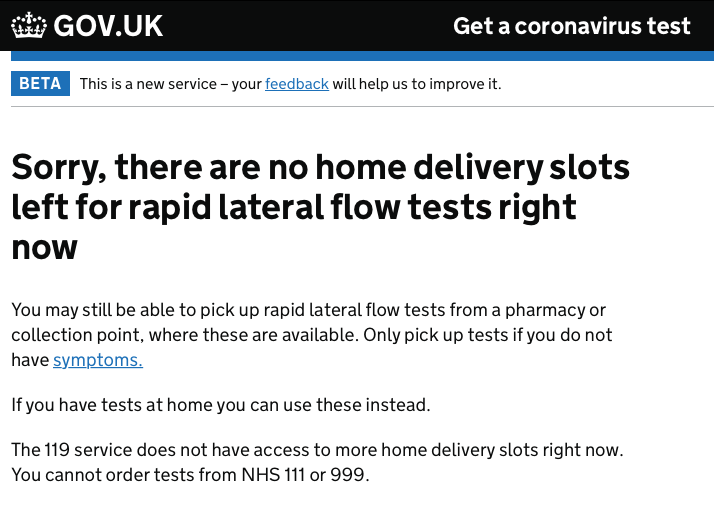
Image of government website showing there are no lateral flow tests available for home delivery

Throughout this, as we’re both double-jabbed and boosted, my wife has been allowed to leave the house and carry on a normal life provided she passes an LFT each day. She has remained negative throughout; so clearly our living largely separately, ventilating the house and wearing masks worked.

Was it Omicron?

Probably. Not all PCR tests are genetically sequenced, and it seems mine wasn’t as I’ve had no confirmation of which variant I contracted, but at the time of my infection Omicron was by far the more prevalent variant in England, and given that I’m double-jabbed and boosted, and therefore incredibly unlikely to contract Delta, and further given the relatively mild nature of my infection, it was almost certainly Omicron.

When was I released from isolation?

Not until midnight on day 10. In theory if I’d had a negative LFT on days 6 and 7, with the tests at least 24 hours apart, I could have been released on day 7 (Monday), but I’ve continued to test positive up to, and including, day 10. If I recall correctly, shortly after the outbreak of the pandemic back in early 2020 I’m sure we were told not to retest for 90 days after we’d contracted the virus as it would still probably give a positive test. I admit this is a different strain, but still it seems to me that all Health Secretary Sajid Javid has achieved by announcing this day 7 “test to release” strategy is unnecessarily increased the demand for LFTs when few are likely to pass these tests. It looks like just a PR stunt to pacify businesses who are complaining about the length of time their staff are absent.

Furthermore the partner, provided they’re double-jabbed, being able to remain at large provided they are negative on an LFT each day that the infected person is in isolation has further upped the demand for LFTs.

Demand for LFTs

At the current rate of 180,000 infections a day, each infected person requires at least three LFTs (one to test positive in the first place, plus two to release), and their partner requires seven. So each infected person is likely to require 10 LFTs. That’s an increase in demand of 1.8m tests a day! In addition we’re all being urged to take an LFT before going out or mingling with others, then it’s no wonder there’s a shortage of LFTs in the UK at the moment!

Any benefits?

I don’t recommend catching Covid to achieve this, but I lost half a stone (7 pounds) in weight over the 10 days…

And, as one of my friends pointed out, I’m now as immune to Covid as it’s possible to be, with three vaccinations and the Omicron antibodies it’s extremely unlikely I’m going to catch Covid again for several months, or until another, different, strain emerges.

h1

“Full Fibre” Broadband – six month trial

November 11, 2021

Updated 19th November following a visit from a Swish engineer.

Further updated June 2022 after I cancelled the contract.

As I mentioned in a previous post, Swish Fibre has been digging up the pavements and verges in my neighbourhood recently, with the promise of “full fibre” broadband with speeds of up to 1Gb/s. “Full fibre” is marketing speak for fibre to the premises (FTTP), meaning high speed fibre-optic cable all the way to your house.

Note: What most ISP’s call “Fibre” is actually fibre to the cabinet (FTTC) which is then carried as ADSL over copper – your normal telephone wire – to your house. Don’t fall into the trap of thinking that because what you have is called “Fibre” that you actually have a fibre connection to your home.

The Swish offering is simple, either 400Mb/s broadband for £45/month or 900Mb/s for £75/month on a rolling one-month contract. If you subscribe for 12 consecutive months Swish will increase your speed to either 500Mb/s or 1Gb/s. This is a symmetric service: upload speeds are the same (similar anyway) as download speeds. This is not usually the case with domestic broadband, indeed the “A” in ADSL stands for “Asymmetric” meaning faster download than upload.

I registered my interest as soon as I was aware of the project, and was recently offered free installation and six months’ free subscription which I thought I’d take up. I was told that many people are trying the 900Mb/s service free, dropping back to 400Mb/s at the end of the free period. I didn’t see the point in this, as I didn’t want to get used to the fastest service and then be disappointed when it dropped back. I also can’t imagine what you’d need 900Mb/s broadband for; so for my free trial I’ve opted for the 400Mb/s service.

What am I comparing it with?

I currently have Sky Superfast Fibre Broadband, which is fibre to the cabinet (FTTC) at the end of my street and then carried over my telephone line. I can usually get 70-80Mb/s down and 18-20Mb/s up. Over my home network, which is a combination of Powerline adapters (yes, I did upgrade them) and Wi-Fi access points, I can achieve around 60Mb/s download, wired or wireless. This, including telephone line rental – necessary for ADSL, costs £32/month, but that’s a special deal, the full cost when that offer expires will be £37/month, so not a lot less than Swish, but Swish doesn’t require, or include a phone line. We hardly use our landline any more, it simply carries the broadband, so I’d probably get rid of the landline if I were to switch to Swish permanently.

First impressions

Installation

This was relatively straightforward, but took about four weeks from placing my order to having working broadband. I recently had an underground cable duct installed to carry my phone line as part of a bigger relandscaping of my front garden, so getting the fibre connection from the Toby box in the pavement (sorry, can’t work out why they’re called that) to my house was trivial.

Toby Box

The way fibre is installed is that the engineers have to connect a small duct from the Omnipoint (where the external fibre connects to the internal fibre) on the outside of your premises, all the way to the fibre distribution point somewhere up the street. Once this duct is connected they blow the fibre filament along the duct. Yes, blow it, with air from a large fan/blower device, the vortex in the pipe carries the fibre filament along. In my case the fibre distribution point was something approaching 200 metres away. However about 75 metres from the distribution point it all stopped. Apparently the infrastructure team which had been tasked with connecting all the intermediate ducts together had missed one, and the fibre could get no further.

A week later the infrastructure team returned to remedy their omission, and about 90 minutes after that another installation team arrived to finish my installation. This went smoothly and within an hour of their arrival I had live full-fibre broadband.

Communication

Could be better. Swish is good at selling but the installation/scheduling team isn’t so good at customer communications. I was told I’d be contacted about a site survey. I wasn’t. Now under the impression nothing had happened I threatened to cancel the whole contract within the period I’m legally allowed to change my mind. Within minutes of this threat a scheduler called me to say they’d done the survey, that mine was a completely standard installation, so installation would be free, and could they install it the following week?

Note: most people don’t have a cable duct, and Swish has been positioning the Toby Box in a location where they expect to dig a trench to the house – unlike conventional copper cable, fibre isn’t self-supporting so it is rarely run overhead unless it has a supporting cable. Digging trenches or running overhead cables will probably be chargeable in addition to the standard installation charge.

After the first installation team hit the “break in the duct” problem they said I’d hear from the scheduler about finishing the installation. I heard nothing, despite emailing her. About a week later a Swish van appeared at the end of my drive to resolve the issue. Only once that had been resolved did anyone contact me regarding reattempting my installation.

Once I’d initially posted this blog I got a lot of communication. Swish certainly monitor social media. I had a call from a senior technician regarding my speed issues and offering to lend me some other equipment. Then I got a call the following day from a scheduler asking if an engineer could call later that day! Well done Swish.

Equipment

The installation requires three bits of kit:

  • An “Omnipoint” on the outside of my house which is where the external fibre meets the internal fibre cable. This is black and about 12cm x 5cm. This is connected by a fine black fibre-optic cable through a hole in the wall of my house to the…
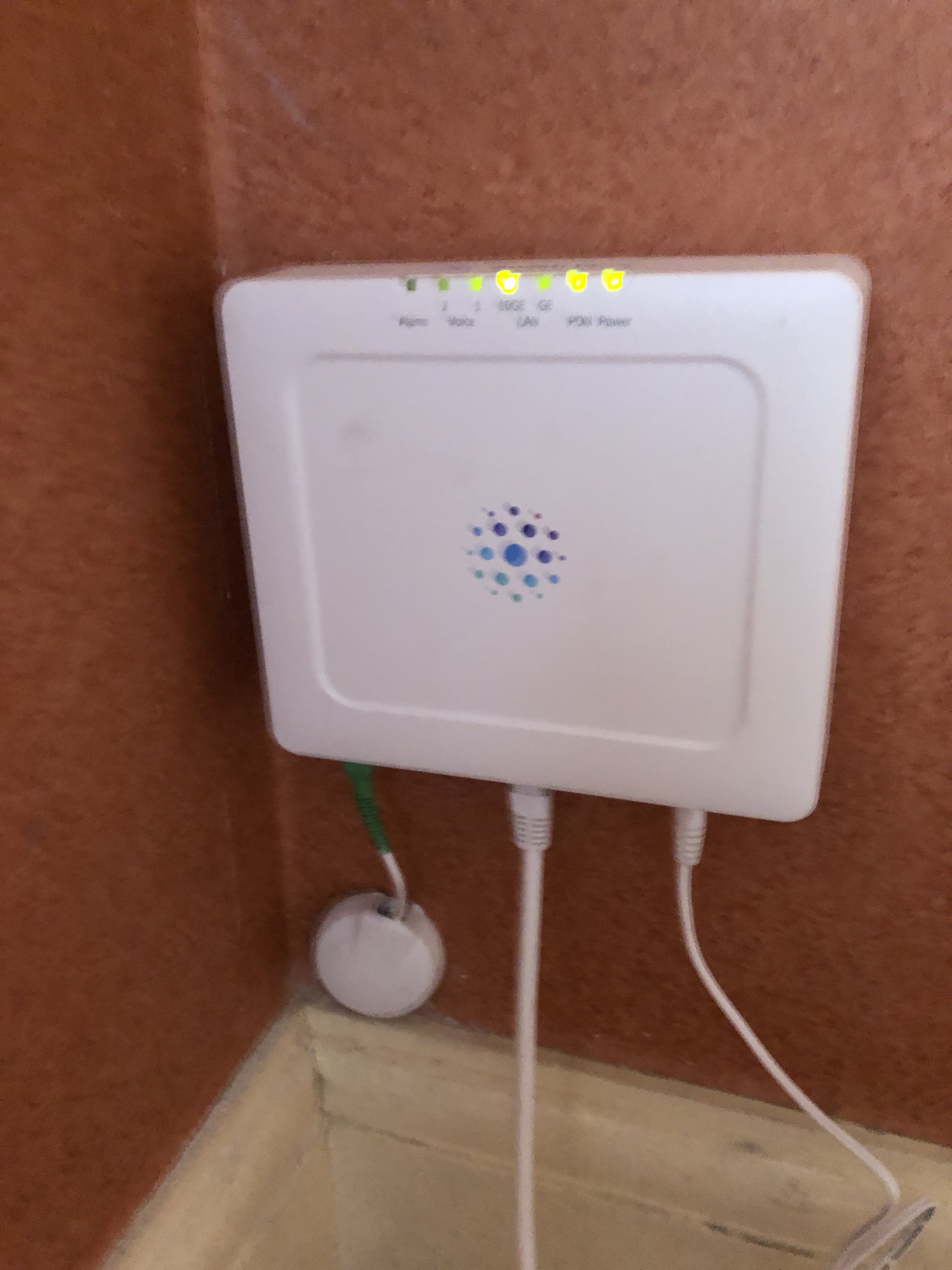
  • Optical Network Termination point (ONT), a white box on the internal wall. This is about 15cm x 10cm x 3cm and is the point where fibre is converted to ethernet.
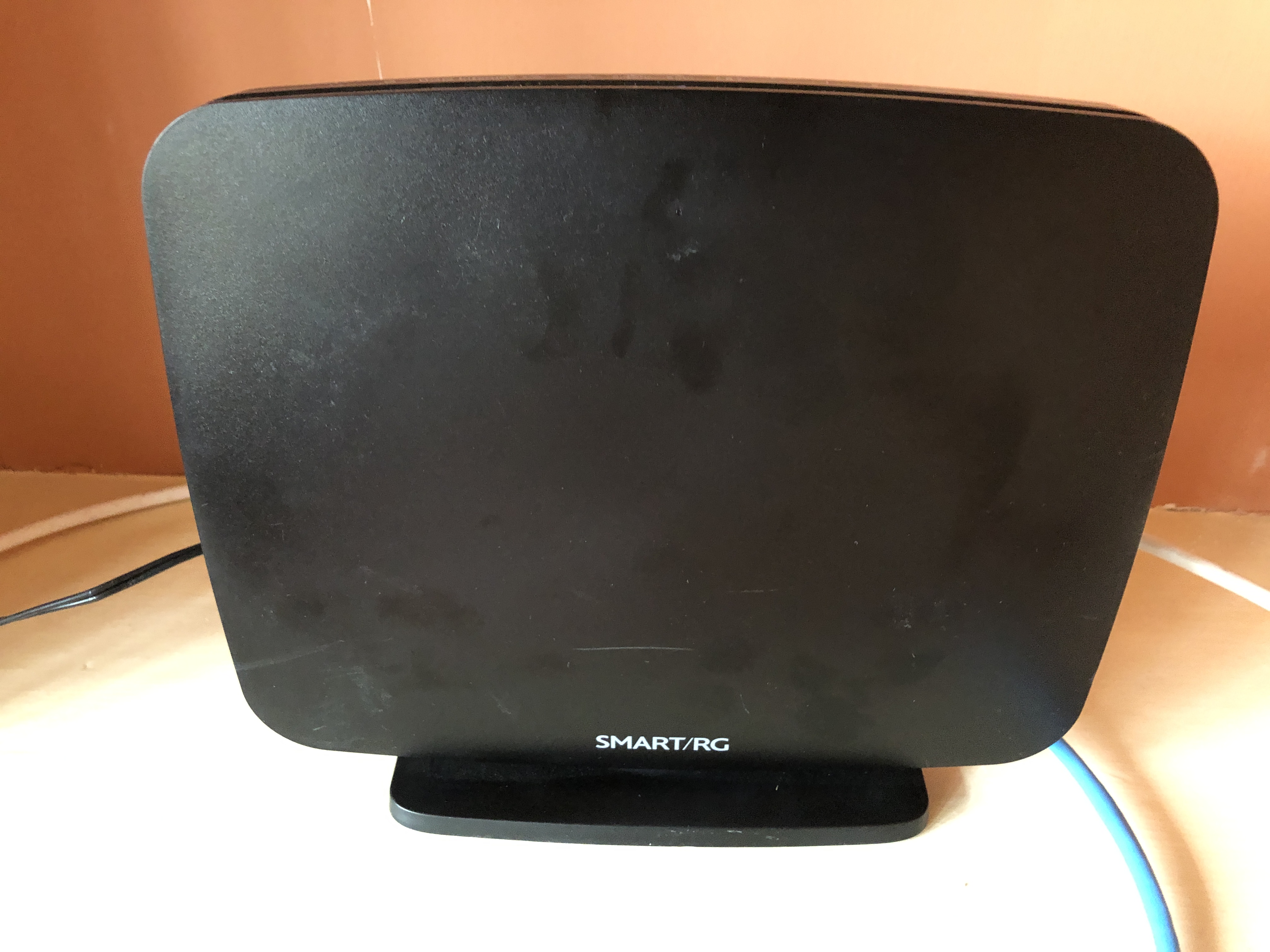
  • And finally a router (or RG – residential gateway) which has a 4-port switch and a built-in dual-band wireless access point.
ONT box

The ONT and the router each require a power supply, so you need two mains sockets nearby.

The installation team was very happy to install the ONT wherever I wanted it, which in my case was my study, from where I run all the tech in the house. The router can be placed anywhere provided it’s directly connected to the ONT with a Cat6 ethernet cable.

Swish Smart/RG router/ Residential Gateway

Performance

Initially disappointing, but that’s largely been resolved. See the update below.

Running a broadband speed checker, even with only a single device connected by cable to the router, I achieve barely 100Mb/s most of the time. I have managed to get it up to 400Mb/s but only very briefly while downloading a large video file from BBC iPlayer. If the broadband had been running at 400Mb/s continuously then this file should have taken around a minute to download; it took several minutes.

I tried again with a video file from Channel 4. The maximum speed achieved during this download was 80Mb/s, which is exactly what I get with Sky Fibre broadband.

Most of the time, obviously, the broadband is running at a low speed, which is all it needs to deliver the content I normally demand, but I did expect it to leap up to use the maximum available bandwidth when required. But it doesn’t. Maybe BBC and Channel 4 can’t deliver content at that speed?

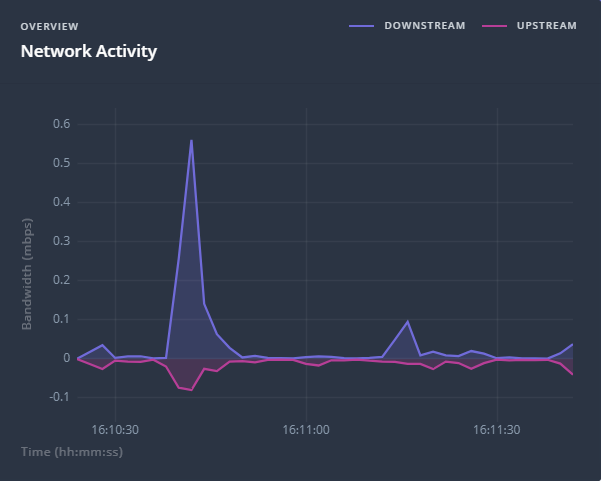
Network activity while writing this blog post. Peaks at 0.55Mb/s

This means my Powerline and WiFi adapters are not stretched at all. Even with a speed checker I can’t get either of them much over 60Mb/s, and they did that with Sky broadband too.

Yes, they are capable of more. The Powerline adapters are rated at 2000Mb/s, which generally means they’ll achieve around 400Mb/s in the real world, and one of the WiFi adapters is capable of 1300Mb/s.

Even the WiFi access point built into the Swish Smart/RG router can’t deliver more than 120Mb/s on a speed test when I’m sitting next to it. And its range is poor compared to either the Sky router or my Apple Airport Express. It must be noted that the Airport Express has a 100Mb/s ethernet port, so it couldn’t handle the full speed of this connection even if Swish were able to deliver it.

Update 19th November – a visit from a Swish engineer

After initially posting this blog, I was contacted by Swish who said they would like to help resolve the issues I encountered. An engineer arrived to look at my installation today. He swapped the Smart RG router out for a “Plume Pod“, which they tell me is their default choice of router for customers who don’t have their own wireless network/mesh/access points. This is a massive improvement. My wired network is currently getting 400Mb/s everywhere – here’s the test I just ran on my Mac:

The engineer installed two further Plume Pods to replace my WiFi access points with a mesh. In initial use (I’ve been using the new system for a couple of hours) this works well, although the Pods have to be quite close together to build a viable wireless mesh. We tried ethernet cabling to a distant second pod, but it simply wouldn’t connect over the cables I’d installed in the house. The Plume Pods appear incredibly sensitive to the category of ethernet cable and refuse to connect over anything other than full Cat6 cables over any more than a few metres. Cat5E works for short cable runs (in our tests 10 metres or less) but Cat5 is just a no-no. The Plume Pods won’t drop back to a lower speed, it’s gigabit ethernet or nothing. This is only to connect them together. If I connect a Plume Pod to a gigabit switch and then run a Cat 5E cable from that to any devices other than another Pod, it works fine – indeed the speed test I’ve posted above was conducted with my MacBook Pro connected over just such a cable, and I managed to achieve 400Mb/s to my Mac over a long Cat 5 cable. We connected the Plume Pods wirelessly in the end, but because of the separation this required a third, intermediate, Pod. I will be re-cabling with Cat6 very shortly.

I can also now get 400Mb/s wireless speeds! Close to a Pod both my Mac and my iPhone achieve very close to 400Mb/s. My PC is a different issue but we suspect that’s a WiFi drivers or a hardware problem which I’m investigating, however I can wire it and get 400Mb/s. Even my wireless NOW TV Smart sticks are getting between 42 and 68 Mb/s – and they’re hiding behind TVs which doesn’t do anything to improve a wireless connection.

If you subscribe to Swish and get a Plume Pod as a router then that first one is provided free of charge. Any further Plume Pods are chargeable at £90 each (I’ve been lent these for now). To cover my house properly would require a fourth Pod, but for the moment I’m sticking with Powerline adapters to get to the furthest corner. Rated at 2Gb/s the Powerline adapters are currently delivering around 160Mb/s – a bit disappointing but I think this due to the electrical wiring in my house.

After letting the network settle down – apparently it takes a few days to configure itself to the normal network usage – I’ll try some more speed tests. Following that I might try reverting to a single Plume Pod and my original WiFi access points and see what speeds I get with those.

Further updates to follow.

Observations

Things I’ve noticed during this exercise which may help you if you’re looking to install broadband that’s faster than 100Mb/s.

  • Ethernet cables make a huge difference. Replace all your Cat5 cables with either Cat5e or Cat6. For long runs use Cat6.
  • Even if an ethernet cable says Cat5e on it, it may not work at more than 100Mb/s. Test it. Connect it to a gigabit device and to your computer. Both Macs and PCs will show you the speed of connection of a network cable. If it doesn’t show it’s connected at 1000Mb/s then replace it.
  • Speed testing software varies hugely. Don’t believe the first speed you get. Most speed checkers are browser based. To get a more reliable indication, find one that allows you to download an app to run locally. To give you an idea, I ran two speed tests one after the other. The first was the Ookla Mac app, this gave a download speed of 396Mb/s and an upload of 401Mb/s. I then ran the Which? Broadband Speed test app which is browser-based. Same Mac, same cable, moments later, this gives download of 104.5Mb/s and an upload of 359.9Mb/s. Which is right?
  • Make sure all your network infrastructure – computers, WiFi access points, switches, Powerline adapters, ethernet cables, smart TVs and set top boxes, are capable of gigabit speeds.

Final Update: June 2022 – Contract cancelled

So my six month free trial came to an end, and I terminated the contract. To be honest if I were still working from home, or if I had a house full of teenagers, I’d have kept it and paid £45 a month. But there are only two of us and FTTC delivers me a full 80Mb/s download and 20Mb/s upload, which is all we need, and I can get that for around £23 a month, so I really can’t justify the extra £22 a month to retain Swish broadband.

One other observation. Two of my three Plume Pods had failed by the time I handed all the kit back to Swish. This meant I ended up reconnecting two of my WiFi access points. The guy who collected all the Swish kit said they’re prone to overheating and Swish is hoping to have some better and more reliable technology available for its customers soon.

Salvation is potentially on the horizon though. Another fibre broadband provider, Hey! Broadband (yes, that’s the company name) has announced their service is available in our area, and as well as a similar offer to Swish at 400 Mb/s, they offer lower speeds – so I could get 100Mb/s for £23 a month, which is much more appropriate…

h1

Some musings on Powerline adapters

July 12, 2021

I’ve been using a set of Powerline adapters in my home for several years. I’ve also recommended Powerline to several of my friends and family to solve networking problems in their homes. But they’re not a panacea for all ills. There are some idiosyncrasies which I discuss here. I hope this proves useful to someone.

Note: I’m writing from a UK perspective. While not a qualified electrician, I’m familiar with UK domestic power wiring (240V). I also have a passing acquaintance with European (Portuguese and Danish, 220V) and US (110V) domestic wiring.

What is Powerline?

Powerline (also known as Homeplug) is a technology that uses the mains power cables in your home to carry computer network signals to deliver a network – usually your broadband connection – to places in your home that are otherwise hard to reach. The signals are carried by a high-frequency radio signal over the copper electrical cables in the wall. It’s a technology designed only for domestic networks. It’s not intended for commercial use.

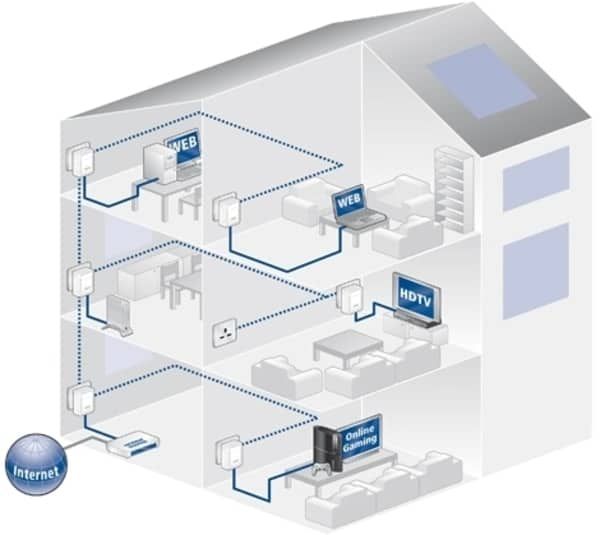
You plug an Ethernet cable from your router, or a point on your existing network, into one Powerline adapter which is plugged into an electric wall power socket. Then you plug a second adapter into a power socket somewhere else in your home and run an Ethernet cable from it to your remote device, which could be a computer, a wireless access point, a TV or a switch to which you connect other computing devices.

Example of the use of Powerline in a home

What types of Powerline adapters are there?

There are different versions for different power systems including US power plugs, UK power plugs, European (Schuko) power plugs and Australian power plugs.

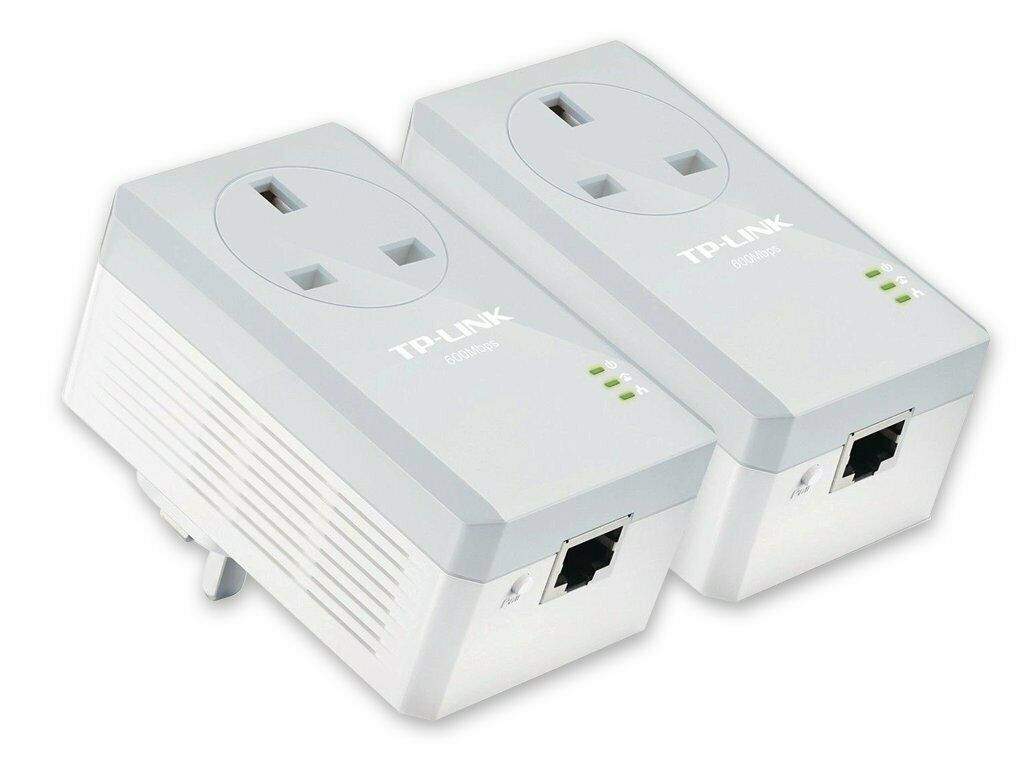
There are versions that occupy a power socket, and there are versions which present a power socket when they’re plugged in; these are known as “pass through” adapters.

A pair of Powerline pass through adapters (UK version)

And there are different speed adapters. The lowest speed, the original versions, were labelled 200 Megabits per second (Mbps). There are 400Mbps, 500Mbps, 600Mbps, 1000Mbps, 1200Mbps and 2000Mbps versions. But in real life I’ve been unable to achieve anything near the claimed maximum speed, so I’d suggest you use a higher speed version than the network you’re trying to connect. I’m using 2000Mbps adapters to carry a 74Mbps network; my neighbour is using much less expensive 600Mbps adapters to carry a 12Mbps network.

Update: I’ve (possibly temporarily) upgraded my broadband to 400Mbps. This has allowed me to do some further testing of my 2000Mbps Powerline adapters. When they’re plugged into adjoining sockets I can get a full 400Mbps through them, unsurprising perhaps. As I move the second adapter to more and more distant sockets the speed drops. Downstairs it drops to around 200Mbps, and at the farthest point (on this ring main) it drops to 160Mbps. Then I wondered why the PC in that room was getting only 96Mbps… I swapped the ethernet cable for another, also marked Cat5e, and magically the speed increased to 160Mbps. So the rated speed of the Powerline adapter, the quality of the electrical wiring, the distance and the quality of the ethernet cable used for connections all make a difference to the actual speed you can achieve.

There are many Powerline manufacturers. In principle, adapters should all inter-operate, but the whole network may drop back to the speed of the slowest adapter, and each manufacturer has slightly different ways of setting up and configuring devices, so it’s generally easiest to use a set of adapters of the same speed all from the same manufacturer if you can. I’ve deployed TP-Link devices and I’m very happy with the build quality, reliability, operation, configuration and performance.

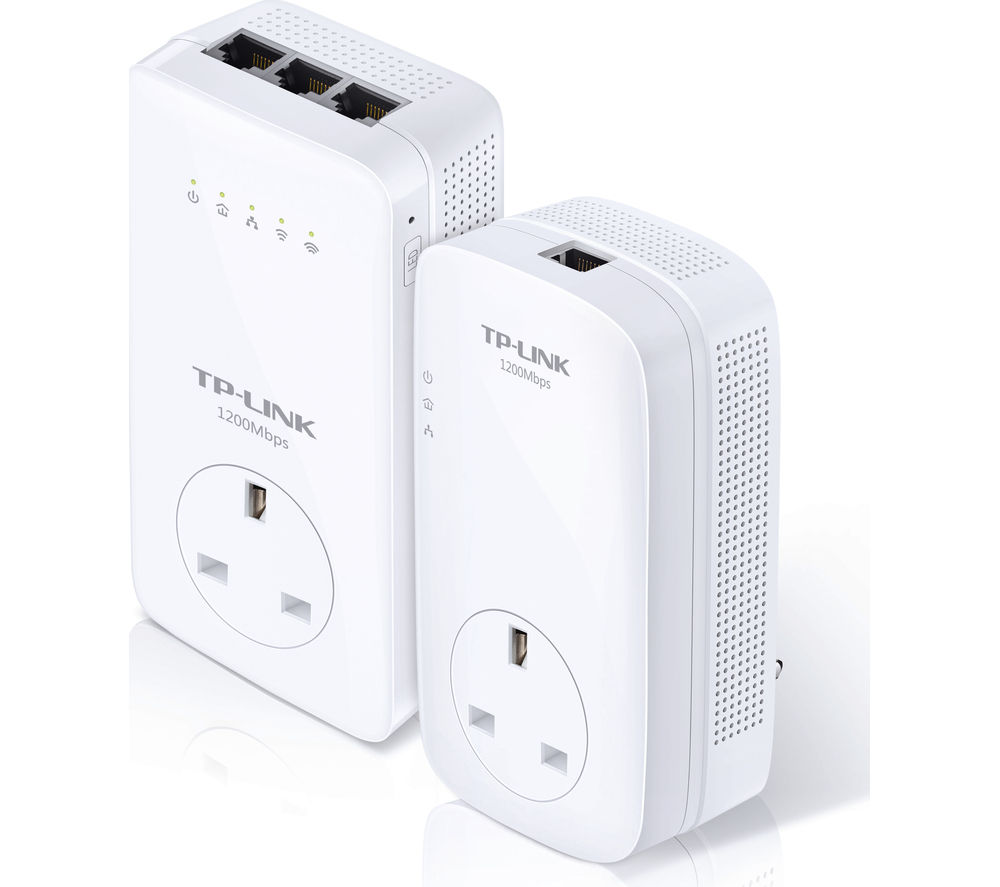
Some adapters offer more than one Ethernet port, so you can use them as a mini switch, connecting more than one device. Some adapters have a WiFi access point built in, so you can instantly set up a new WiFi network without any other devices, or you can use Powerline adapters to extend an existing WiFi network.

This pair of adapters shows one that combines both multiple Ethernet ports and a wireless access point

Decide how you want to use Powerline in your home and then select appropriate devices.

Will Powerline work on any home electric circuit?

To get the best performance you should plug the Powerline adapters directly into a wall socket – extension cables and particularly surge protection devices will attenuate the signal or even filter it out altogether.

Furthermore, it’s recommended that adapters are plugged into the same electrical circuit. Some houses have a separate circuit (ring main in the UK) upstairs from the one downstairs, and some houses which have been extended may have a separate circuit in the new build from the original building. Almost all houses have a separate circuit for sockets in the kitchen.

This doesn’t mean they won’t work across circuits, but they may not. Much seems to depend on how the circuits are protected. Older fused circuits appear to allow Powerline adapters to work across circuits; mini circuit breakers (MCBs) also seem to work, but residual current devices (RCDs) are more problematic. You may need to borrow a pair of adapters from a friend and try them, or make sure you can return the Powerline adapters to your supplier if they don’t work in your home.

Will Powerline work across phases?

In the UK, almost all domestic properties are supplied with single-phase power, but in other countries three-phase is more usual. Powerline adapters aren’t designed to work across phases, so if you’re trying to use them in a three-phase installation you may need to try and rearrange the circuits so the sockets you are trying to connect are both on the same phase. Consult an electrician.

You may be able to use an additional pair of Powerline adapters to bridge phases – I discuss this in more detail later. If you’re in the USA you may be more likely to get them to work across phases – that’s because you are very likely to have a 3-phase 110V installation and a high-power device that bridges two or even three phases. This may allow the Powerline signals to pass. There’s no hard and fast rule about whether they’ll work or not. You’ll just have to try it.

Are there any problems using Powerline?

Because the signal is carried on domestic wiring by high-frequency radio it may interfere with other devices – radio hams have reported Powerline causing interference with their radio equipment Also Powerline itself can be affected by interference from other devices plugged into the power network – I’ve seen reports that microwave ovens cause interference to the Powerline network when they’re operating.

Is my Powerline network secure?

All Powerline adapters are secured with a private key. They are configured by default with a standard key, so out of the box all adapters should work together, even those from different manufacturers.

It’s unlikely that your signal will pass your electric meter. It is also unlikely to pass onto another electrical phase, so it’s very unlikely that your neighbour will be able to connect to your network. But if you live in an apartment block, or in a shared house, then it may be advisable to change the encryption on your network to avoid possible eavesdropping.

All Powerline adapters support this. You can force one of your adapters to generate a new, random, private key and then pair the others with it. Consult your user’s manual on how to do this as each manufacturer, and even different models, may do it differently.

Can I use more than two adapters?

Yes, you can. If you’re using the default configuration you can simply plug in another adapter. If you’ve changed the encryption you will need to pair the new adapter with one of the existing adapters. Again, consult your user manual(s) on how to do that.

My experience is that adding a third and a fourth adapter worked fine, but more than that degraded performance significantly. I currently use three on my home network. They are all on the same electrical circuit, and with broadband speed at the router of 74Mbps I can achieve a 70Mbps connection at each of the remote adapters.

If I can’t get them to work well across electrical circuits, can I bridge them?

You can, but I’ve tried it in my home and my experience suggests that the performance may still be significantly reduced.

You will need to find a socket on one circuit that’s physically close to a socket on the other circuit, plug a Powerline adapter into each of these, and connect them together with an Ethernet cable.

However, to avoid creating a network loop, which will cause problems, you must arrange that the adapters on one circuit are unable to communicate with those on the other circuit via the electric cabling. To do this pair one set of adapters with a new private key (see above and refer to your user manual). You’ll end up with two adapters on one circuit using default encryption, and two adapters on the other circuit, paired together using a new random private key. Then you connect an adapter on one circuit by Ethernet cable to an adapter on the other circuit, creating a bridge.

I believe it is possible to use a specialist connector to bridge circuits at the fuse box/consumer unit, but I’ve only seen devices that do this for 110V US circuits. I’ve not found a UK 240V or a European 220V version.

Is Powerline better than wireless networking?

This depends on the situation, but in many situations, in my opinion, yes. My networking mantra is, “If you can wire it, wire it”. Connecting networks with physical cables is more reliable, more secure, and usually more performant than wireless.

But if you have multiple electrical circuits and have problems getting Powerline to work effectively then short of running an Ethernet cable round your house – which can be messy and expensive – wireless may be the better solution.

I use both. I prefer Powerline, but I have a room which is on an electrical circuit which won’t work reliably with Powerline from my router no matter how it’s connected. So I’ve installed a wireless repeater to get a decent bandwidth signal to the smart TV in that room.

h1

Why low-cost long-haul airlines will always fail

July 6, 2021

I read an article in the Guardian today about a couple who had booked a transatlantic flight with Norwegian Air. Due to Covid they were unable to go. Ultimately Norwegian cancelled the flight, but this couple unwisely accepted vouchers before this happened. Now Norwegian has withdrawn from transatlantic flghts the couple have a lot of vouchers valid only for European travel.

As the article explains, they were unwise to choose vouchers rather than wait for Norwegian to cancel the flight in which case they’d have been entitled to a full refund. But that’s not the point of my post. The point of my post is that low-cost long-haul carriers will always fail, eventually.

There are lots of previous examples. Laker’s AirTrain was the first of many. Braniff, Wow and others followed. Norwegian is just the latest.

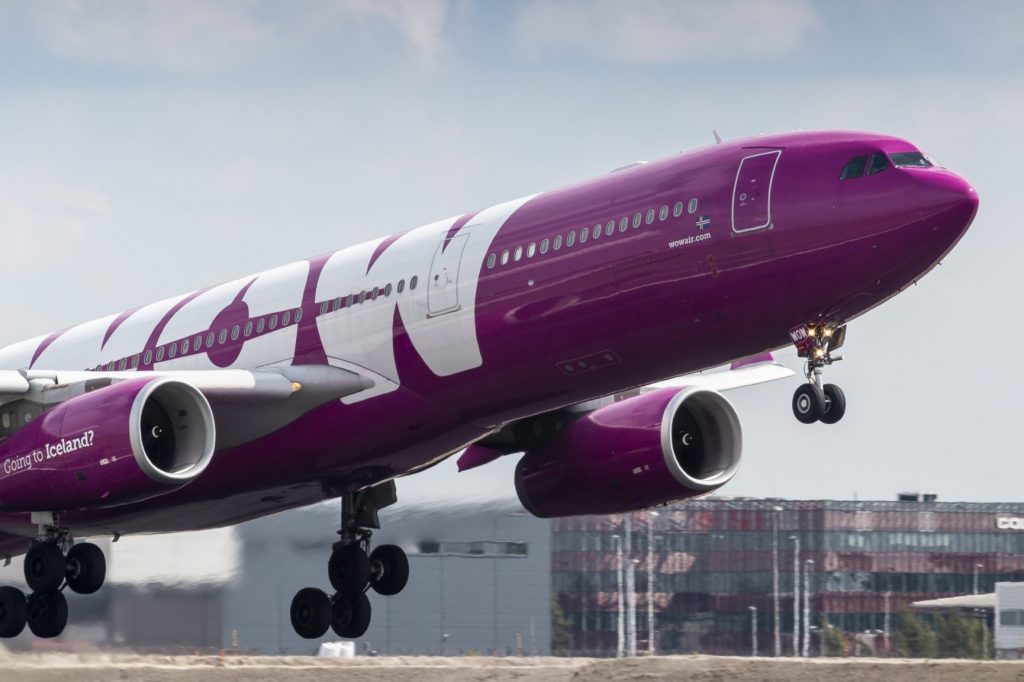
Now Defunct WOW Airlines

You see the low-cost airline model can work for short haul. Most short-haul flights are two hours or less. And short-haul flights usually (for a full-cost carrier) take between 45 minutes and an hour to turn around for the return leg. Low-cost airlines reduce this to about 20 minutes. It can’t be any less because the aircraft brakes have to cool from the landing in order to work effectively in an emergency on take off.

But the advantage is that if your aircraft is flying, on average, 90 minute legs, and turning around in less than 30 minutes, then it can operate up to 12 legs in 24 hours. A full-service carrier flying the same route can fly only 9 legs in the same 24 hours, so the low-cost carrier can get another three plane-loads of people to pay for seats. Of course most aircraft aren’t scheduled fully for 24 hours, but the principle is clear: a low-cost carrier generally can get two extra legs a day from each aircraft it operates.

This, combined with the “no-frills” approach of minimal luggage allowances, all extras to be paid for, having the cabin crew clean the ‘plane and trying to flog lottery tickets and tickets for onward travel on board (on all of which the airline makes a margin) enables them to make the upfront advertised cost of each seat much lower than a full-service airline.

That’s how it works.

But it can’t work in long-haul. In long-haul most aircraft fly one or two legs in 24 hours. So shaving 30 minutes off each turnaround gains an hour a day – not enough to fly another long-haul leg. If airlines operate the latest generation of fuel-efficient aircraft then the no-frills savings and add-on revenues might just make a low-cost airline viable provided all flights operate close to 100% full. But this is tricky at the best of times, often requiring overbooking and then bouncing some passengers off the flight. This doesn’t endear you to your customers, so most full-service airlines aim to achieve an average of better than 80% loading. Low-cost carriers can’t afford loading this low, there just isn’t enough margin on the revenue they generate. Also full-service airlines have premium cabins (Premium Economy, Business and First Class) – this isn’t common on low-cost services, so the additional revenue from premium cabins is denied to them.

Then there’s another problem; having enough aircraft, and crews. If you’re flying short-haul around Europe and one of your ‘planes breaks, then it’s generally not a problem to find another one to rescue the passengers. It’s easier for a full-service airline as their higher revenues means they may well have a spare aircraft available and can call crews up quickly. Low-cost airlines can do it although it may take a bit longer and it may be more effective to rebook your passengers on another airline – or just abandon them, as some low-cost carriers have done in the past .

If you’re flying long-haul then it’s much harder. The larger, full-service airlines can usually find another aircraft although it may take up to 24 hours to get it where it’s needed, as I’ve experienced on a couple of occasions. But when this happened to some friends of mine who were booked to fly on Norwegian to Los Angeles for a wedding, there was no replacement aircraft. They were three days late, ended up flying on a plane chartered by Norwegian as the airline didn’t have a replacement, and they missed the wedding!

Image of a Norwegian Air Boeing Dreamliner
A Norwegian long-haul Boeing Dreamliner

Norwegian has managed to keep operating its long-haul services for longer than most of its predecessors, but that’s mainly because it had a profitable European short-haul business to subsidise the losses. but the Covid pandemic put paid to that. So it’s pulled out of transatlantic flying.

I could have told you it would. In fact I told several people right at the start when Norwegian announced it would be offering low-cost transatlantic travel that this would happen. I couldn’t predict when, but it was going to happen.

I’m reminded of Sir Richard Branson’s famous quote, “The way to make a small fortune with an airline is to start with a large fortune.” He should know. He ended up running a full-service transatlantic airline – very good it is too – but it’s not low-cost.

h1

To fibre, or not to fibre, that is the question

March 19, 2021

OK, I’ll come clean. I already have fibre broadband. That’s FTTC (Fibre to the Cabinet). Then the connection from the cabinet on the corner of my street to my house is copper wire multiplexed over my phone landline.

My ISP (Sky) offers a maximum speed of 80Mbps (mega BITS per second), and when I test it with a computer hard-wired to the router I get all of that.

But there’s a chap with a digger making a hole in the pavement outside my house.

He’s a contractor working for Swish Fibre, which is installing an entirely different sort of fibre broadband. This is FTTP (Fibre to the Premises). This means fibre all the way to my house with a potential maximum speed of 1Gbps. I could get the basic 400Mbps version, 5x faster than my current broadband, for not much more a month than I’m currently paying Sky.

Fibre to the premises…


There are, however, some questions which I’m pondering.

Do I still need a landline?

My existing Sky broadband includes an analogue phone line. Of course it does, because it’s the copper wire that connects me to the phone network which also carries the broadband signal from the cabinet to my home. Do I still need a landline? Probably not. I was getting approximately 20 times more scam calls than genuine ones, although Sky Talk Shield has done a brilliant job of stopping those. I think we currently get no more than three landline phone calls a week.

Could I get those people to call our mobiles instead? Yes, I could, and that would solve the problem of the scam calls.

Can I use the extra bandwidth?

At the moment I’m using PowerLine adapters, rated at 500Mbps – which IRL actually means 50-65Mbps. This is OK, it’s almost the full broadband bandwidth. But what’s the point of increasing my broadband connection to 400Mbps if I’m throttling it to 50Mbps internally?

So I’m now debating, do I lash out £200 on some 2000Mbps Powerline adapters which might get much closer to 400Mbps, but I won’t know until I install them? Or do I embark on chasing plaster and drilling walls and installing an internal Cat6 Ethernet network to actually make use of the higher bandwidth?

Do I need this at all?

Or do I admit that, now I’m largely retired, 50Mbps is plenty, and I just stick with FTTC from Sky? In which case I might lash out on some new PowerLine adapters just to get the full 80Mbps over my existing network. Now that seems like an easy way to improve my broadband speed without getting building dust everywhere…

h1

Lack of vision in Apple design

March 3, 2021

Prompted by a question on Quora, I went into a rant about the connectivity, or lack of it, on new MacBooks and the incompatibility of different Apple devices. This is an edited version of my answer.

Today I forgot my Macbook charger, and was only able to charge it with my friend’s Android charger, not my iPhone charger. Isn’t it ironic? Don’t people find that Apple lacks coherence?

I agree with you. Apple probably makes money from this situation by selling its own connectors and adapters, and it maintains control over its “walled garden”. 

I find the incompatibility of USB C with Lightning connectors infuriating. It suggests to me a lack of vision from the company, and hints at silo thinking from the design and product management teams. But it does explain why you get a Lightning to USB C cable with a new iPhone – it’s so you can connect the phone to your Mac. Apple’s assuming you already own a charger from your previous phone, so you can carry on using your old chargers with their old USB A to Lightning connectors to charge the phone.

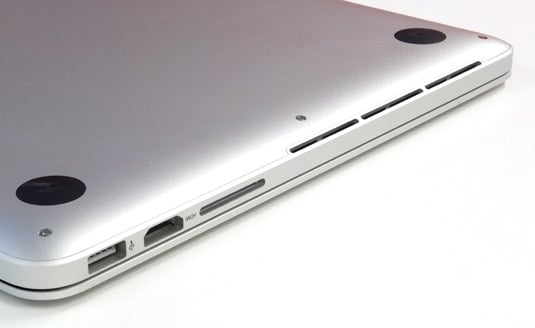
I currently use a Late 2013 MacBook Pro. It has two USB 3 ports, two Thunderbolt/miniDisplayPort ports, a 3.5mm audio socket (which also outputs optical digital audio) an HDMI port and an SD card socket. It also has a MagSafe 2 power connector. It still works perfectly, and I love it, but it’ll be out of support later this year.

2013 MacBook Pro 13″ Retina showing HDMI and SD card sockets

One of the major things that has stopped me upgrading to a new MacBook Pro is the poor connectivity on the new models. With only two USB C ports, one of which you have to use for power, buying the equivalent new model would force me to buy an expensive dock connector, just to replicate some of what I’ve already got.

I understand Apple’s trying to make the new MacBooks as light, and thin, as possible, but in my view this is a triumph of design over utility. I would happily sacrifice a few grams and a couple of millimetres of thickness to avoid having to carry around an expensive bag of adapters that collectively weigh more than the power supply!

I mourn the demise of the MagSafe power connection and the SD card socket. I realise not many people were using the optical digital output – but I do, and I will miss it. I also resent being forced to buy yet another expensive adapter – USB C to 3.5mm – to use my headset. I already own a Lightning to 3.5mm adapter so I can use it on my iPhone!

And, as you suggest, the incompatibility of the ports on a MacBook with the port on an iPhone really rankles. 

Come on Apple, let’s see either a coherent and rational explanation for your choice of ports and connectors, or alternatively some signs of joined-up thinking in product design.